Work
Play
About
Led designs for Arc Intelligence, modernizing the platform for a new era of privacy work
Team
Titan Hoang (Product Designer)
Spencer Abrams (PM)
Yhareli Miller (Motion Designer)

Client
TrustArc
Design Services
UI Redesign
Concept design
Production design
Design system
AI features
Interactive Prototypes
0 → 1 Design
Design Impact

Design impact contributed to TrustArc’s acquisition by Main Capital Partners (2025)


Shipped AI features, designed complex workflows, and created a new design system


UI Design Gallery
A closer look at a few screens I’ve designed across TrustArc
Redesigned Home Page
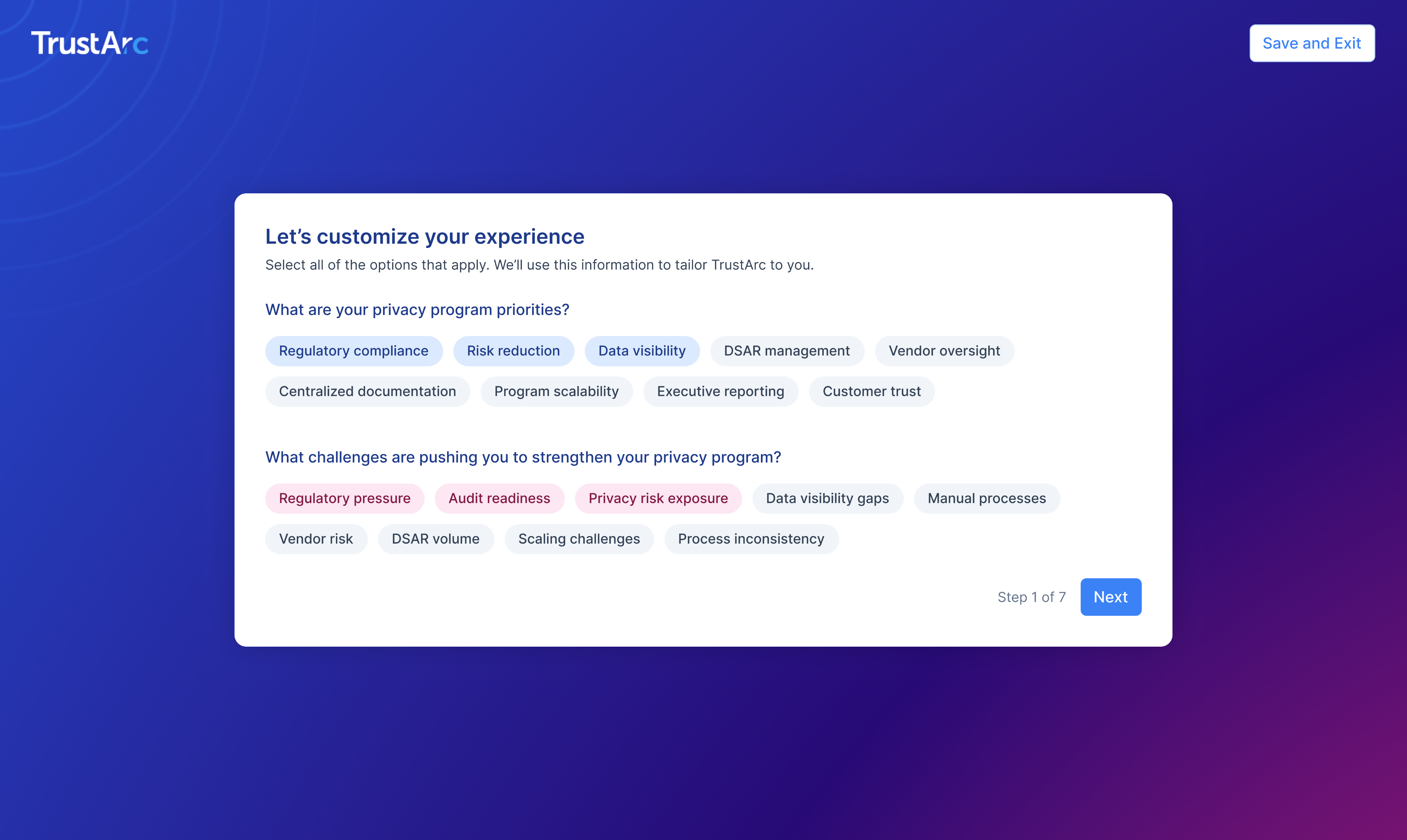
Onboarding Step
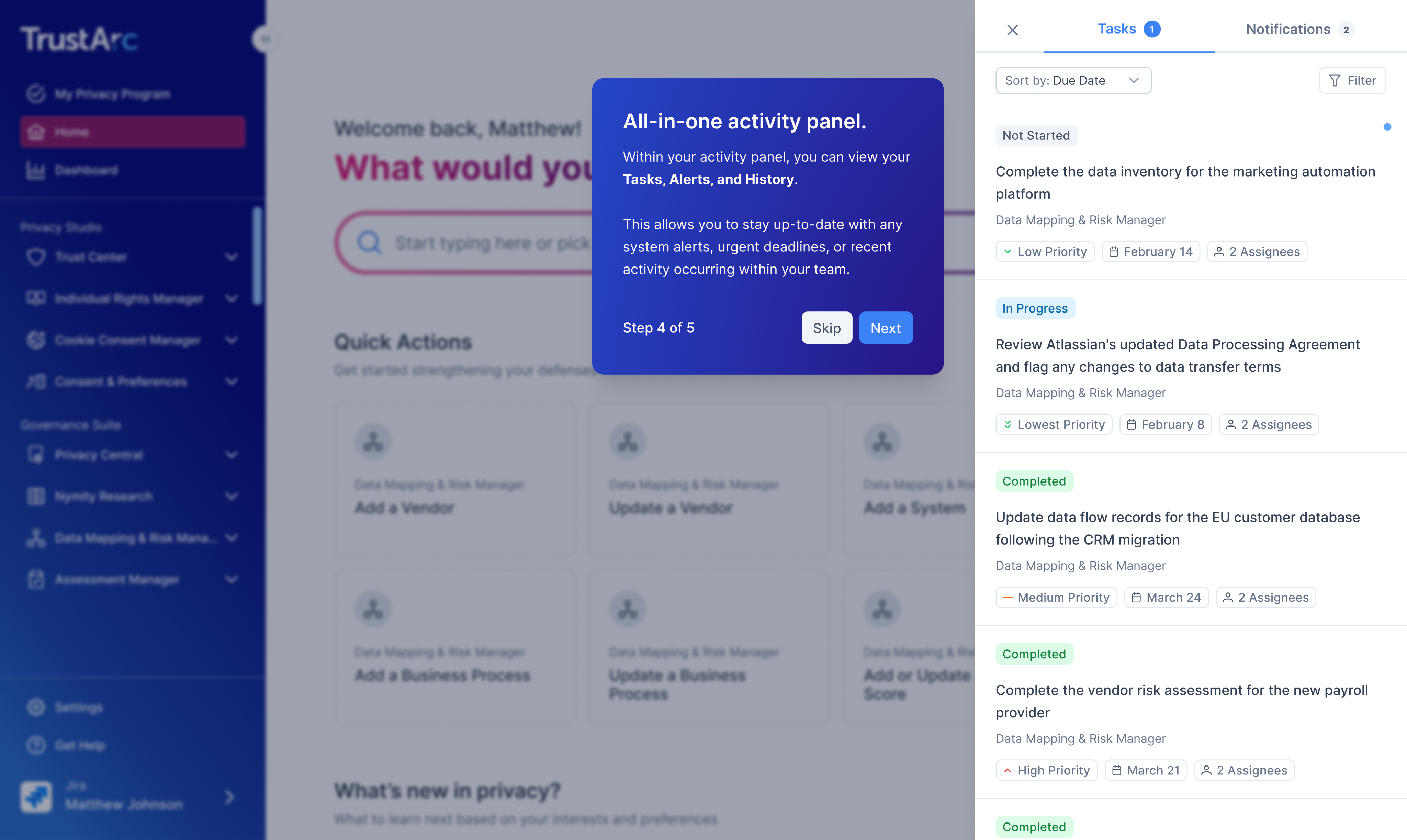
Quick Tour Step
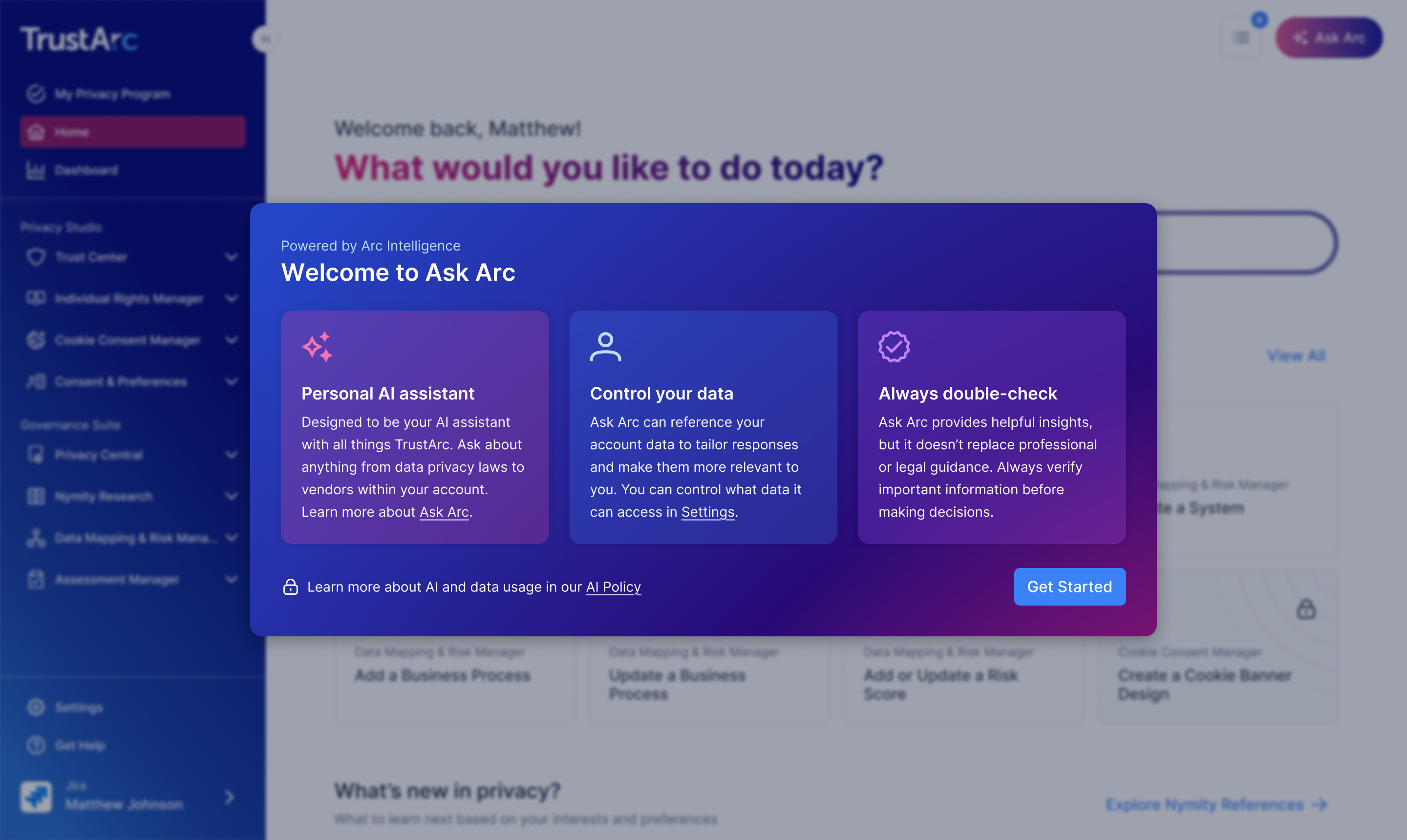
AI Usage Disclaimer
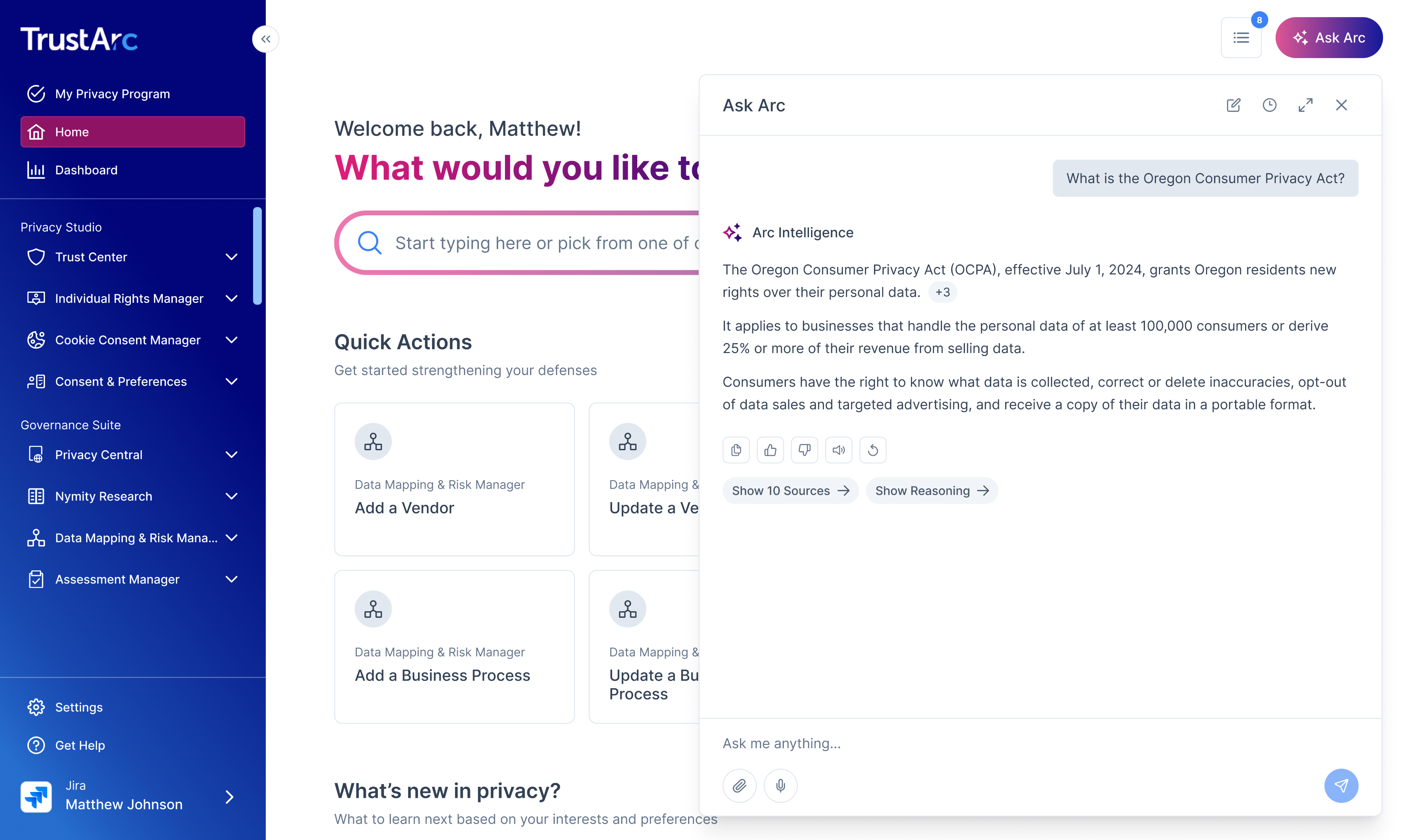
Ask Arc Chatbot
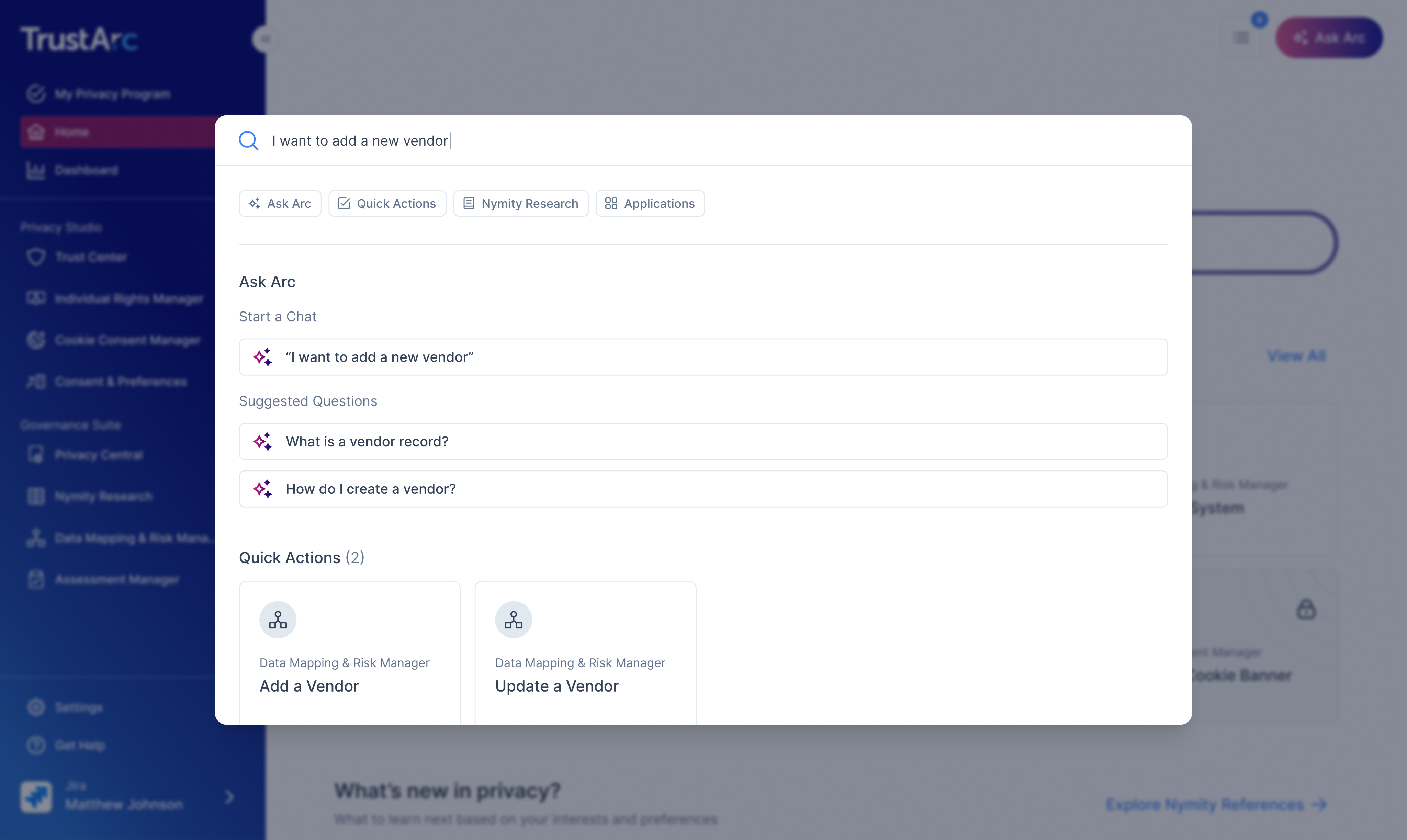
Command Bar
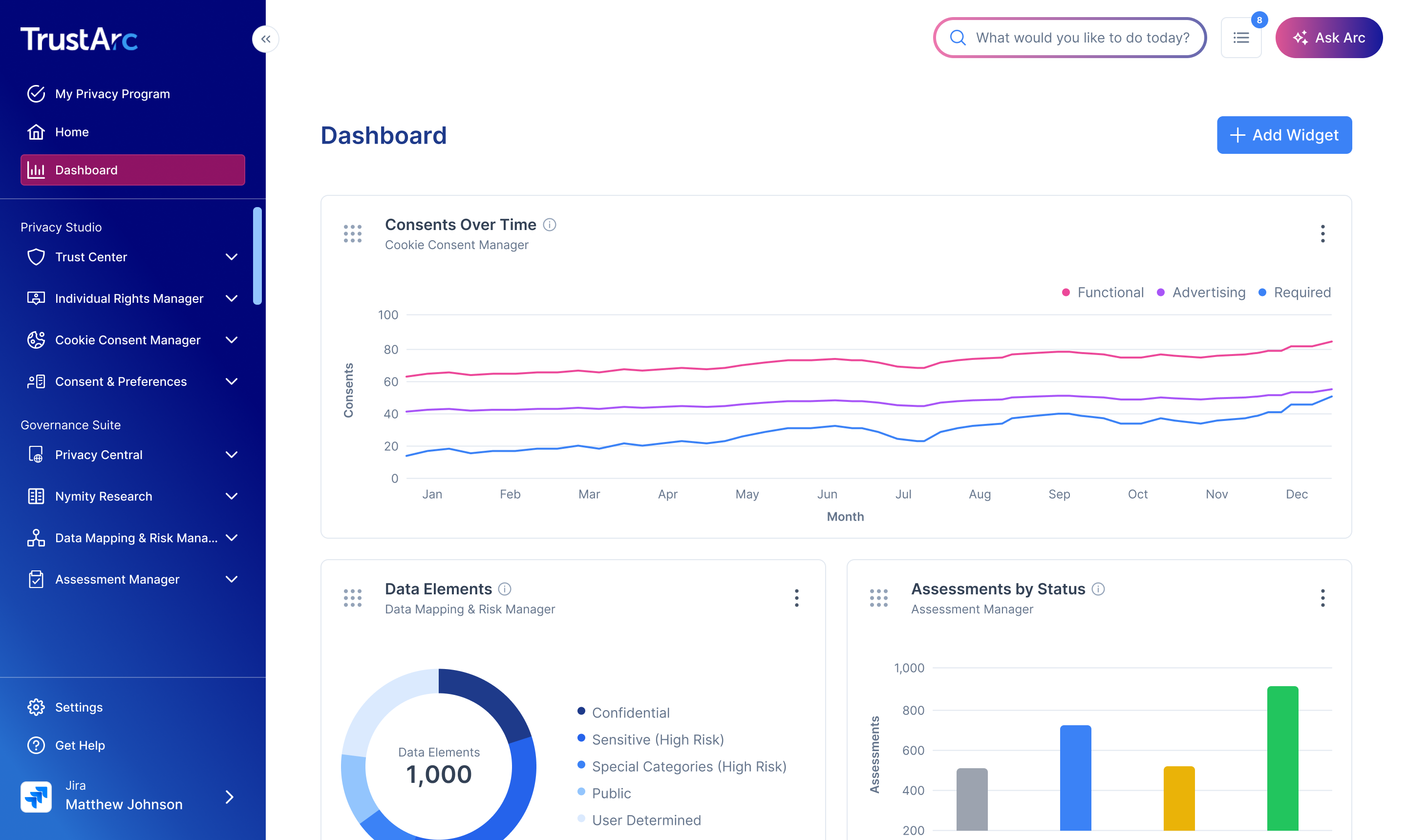
Dashboard
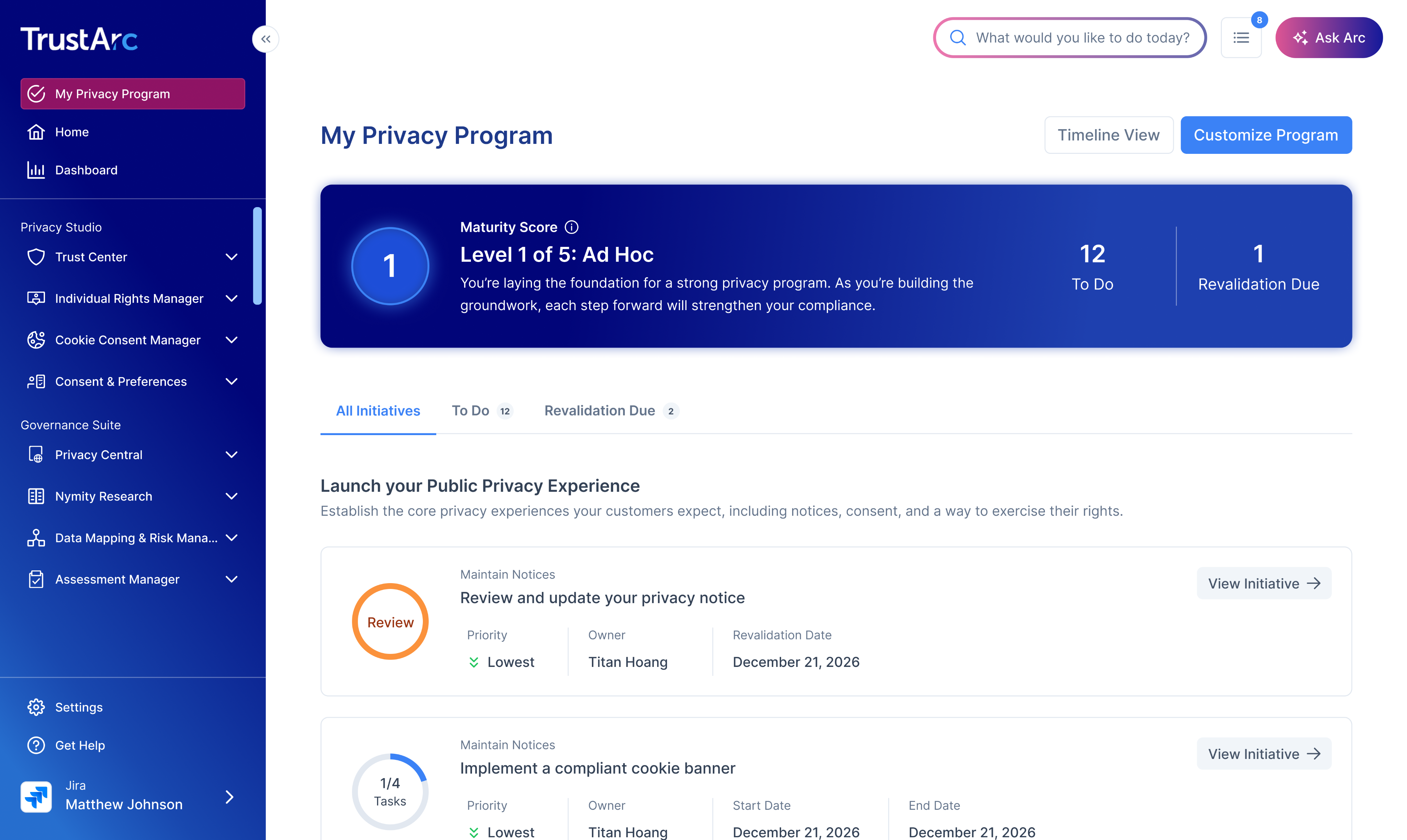
Privacy Program Overview
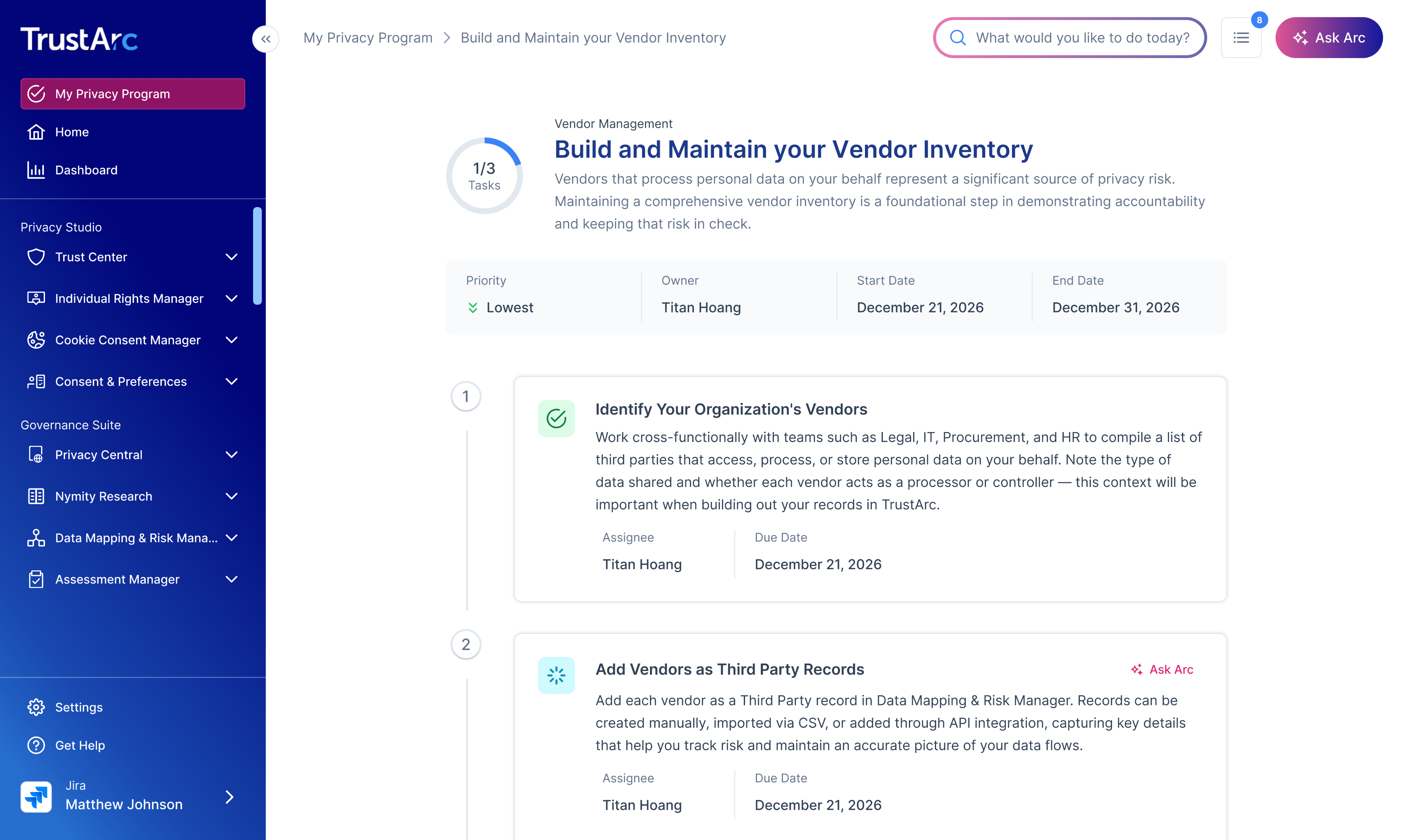
Initiative Details Page
Designing and Shipping AI features
Empowering privacy professionals to work smarter and faster with AI.
Privacy work is hard. The laws change constantly, they differ from country to country, and TrustArc, the platform teams use to manage all of it, had a reputation for being tough to learn on its own due to it’s complex capabilities and unintuitive UX.
TrustArc's support team was always flooded with questions about how to use the product, even though a dedicated help site existed. Meanwhile, staying on top of regulatory changes meant users had to comb through a massive research library on their own.
The goal was clear: users didn't need more documentation to dig through, they needed a smarter way to get answers and get work done quickly.
Ask Arc
I designed Ask Arc, an AI assistant built directly into TrustArc that users can open from anywhere in the platform.
It pulls from TrustArc's help documentation and Nymity Research, a knowledge base covering global privacy regulations, to give expert answers in context and remove the need to search for answers themselves.
Now, instead of digging through hundreds of articles to understand a regulatory change or figure out a workflow in the platform, users get what they need right where they're working.
Quick Actions
I also designed Quick Actions, simplified AI-enabled workflows on the home page that cut the platform's most common crucial tasks, such as creating forms and records, down to only the steps that matter.
The focus goes beyond just trimming down steps. With the addition of AI support, agents can now do the heavy lifting in most forms by pulling data from external sources and filling it in automatically (e.g. company details when creating a vendor) so that users can focus more on reviewing than typing.
Tasks that used to feel long and tedious now take a fraction of the effort.
Results
Both features shipped to strong reception and high adoption. Customers told us they were creating vendors in a fraction of the time and moving through their work noticeably faster than before.
“The fact that it can tell me if it’s compliant is a game changer for my team. It takes us days to figure that out today.”

Enterprise user @ IAPP PSR 2025
“It used to take us 3 days to find duplicate records in the system. This is significant time saving.”

Enterprise user @ IAPP PSR 2025
“The UI is amazing. Impressed by how it finds duplicate records in less than 2 minutes.”

Enterprise user @ IAPP PSR 2025
Designing for Complex Problems
Creating an intuitive way for organizations and users to customize their Ask Arc experience.
As Ask Arc grew in adoption, users wanted to customize it with MCPs, which are custom capabilities that connects the AI assistant to external apps.
This created a need for complex permission settings at various account levels and cascading configurations. I know, pretty confusing.
Since this is very complex and users are new to AI, I needed to design this in an intuitive way that will be easy to use.
Mapping the Design
We started with discovery sessions across a range of stakeholders to nail down the requirements and how tool permissions for MCPs should behave at each level.
From there I created a concept map, which did double duty: it let me visualize the logic I was designing and gave stakeholders something concrete to react to and align on.
Once the logic was agreed on, I translated it into concept designs for validation.
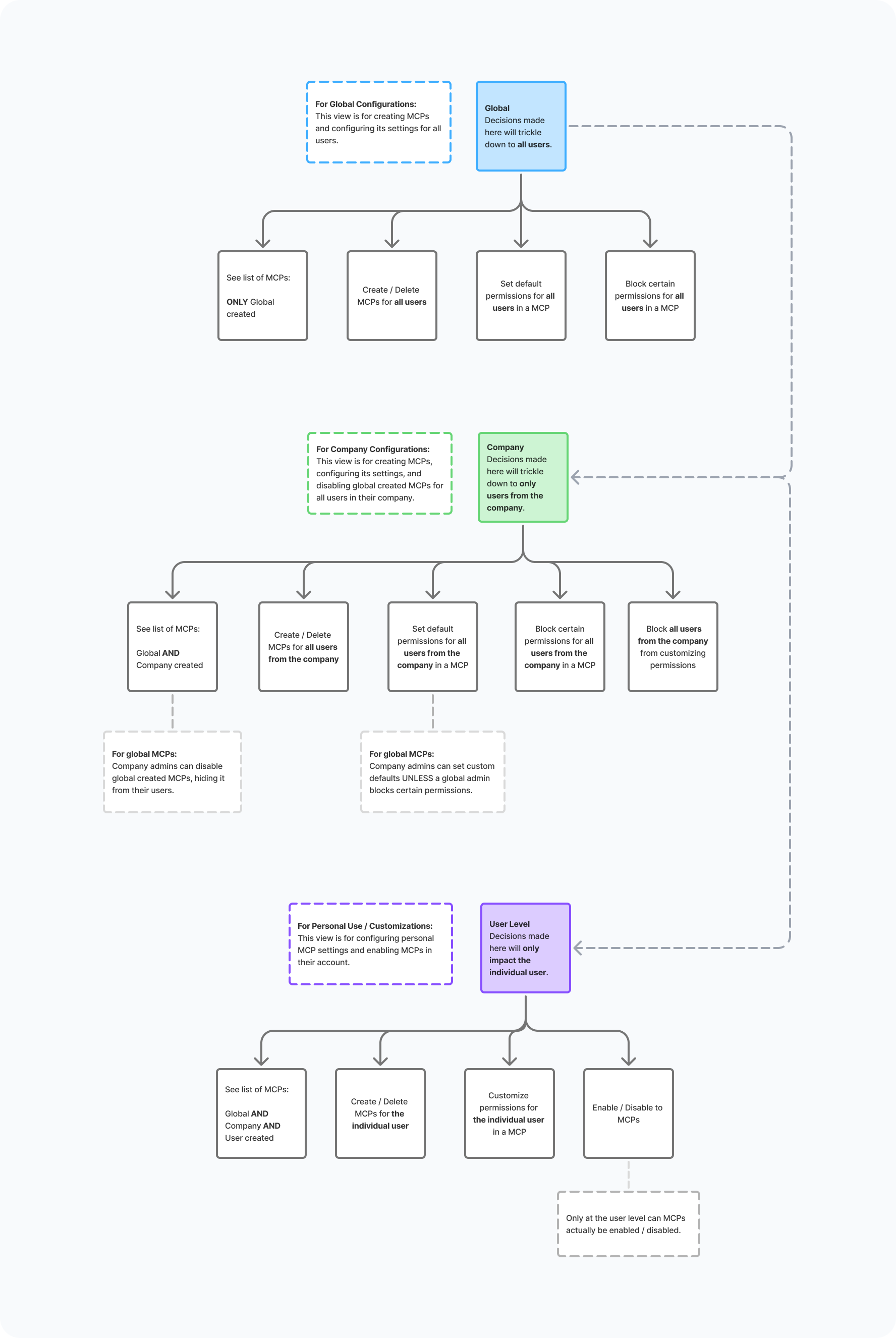
Concept map of relationships between different account levels
Feedback & Iterations
With a design this complex, I knew my first pass wouldn't be my best one so I presented interactive prototypes to various stakeholders early and often. This gave me great insight into my design’s usability, especially when access to real users for validation is limited.
Critiques with developers and executives surfaced flaws in my logic and gaps in my designs, and each round brought the design closer to something people could actually follow and understand.
After 3 rounds of iterations, I landed on a final design that earned buy-in across the team, and we shifted from concept to production.
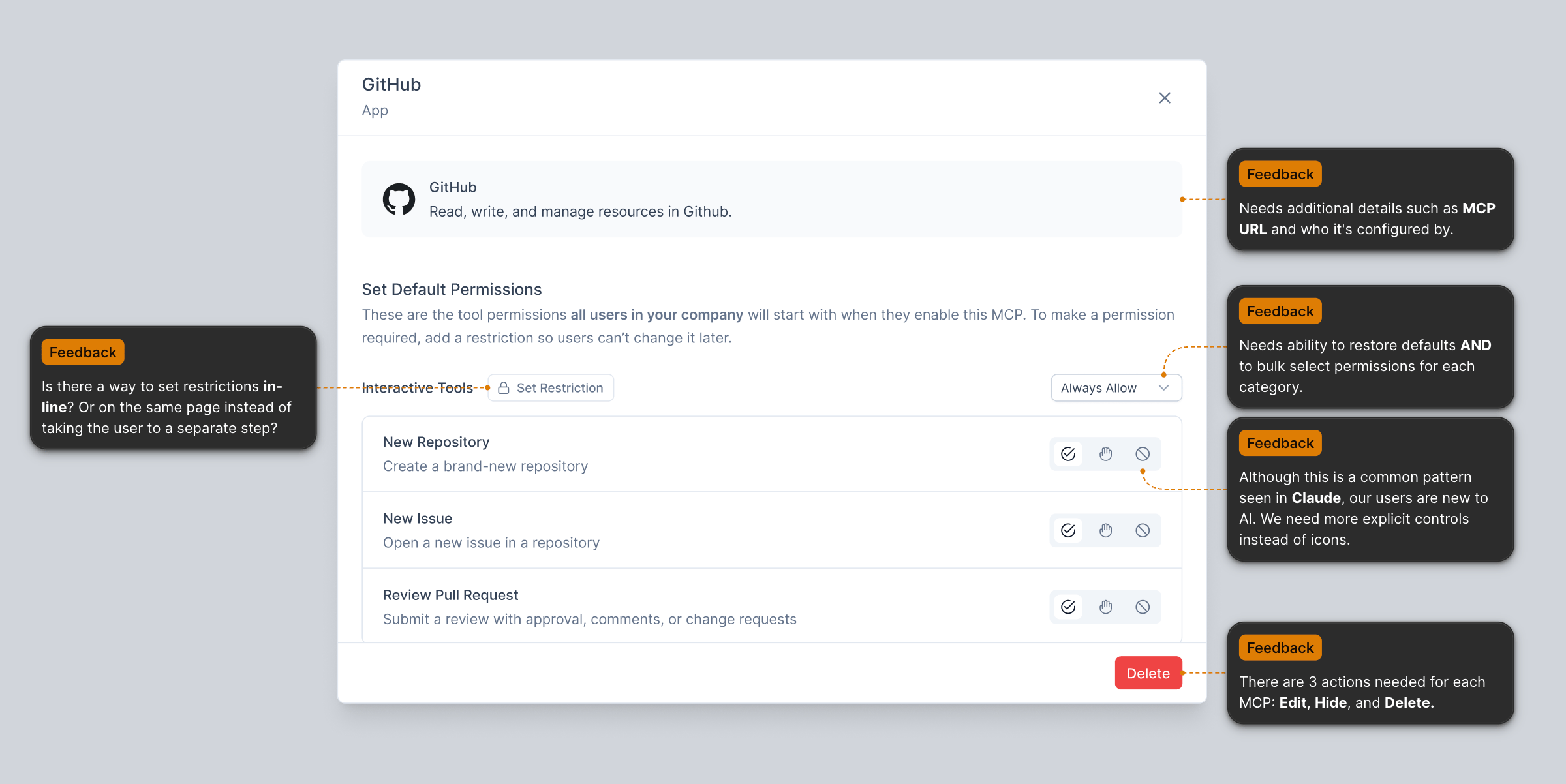
Feedback on V1 of MCP settings

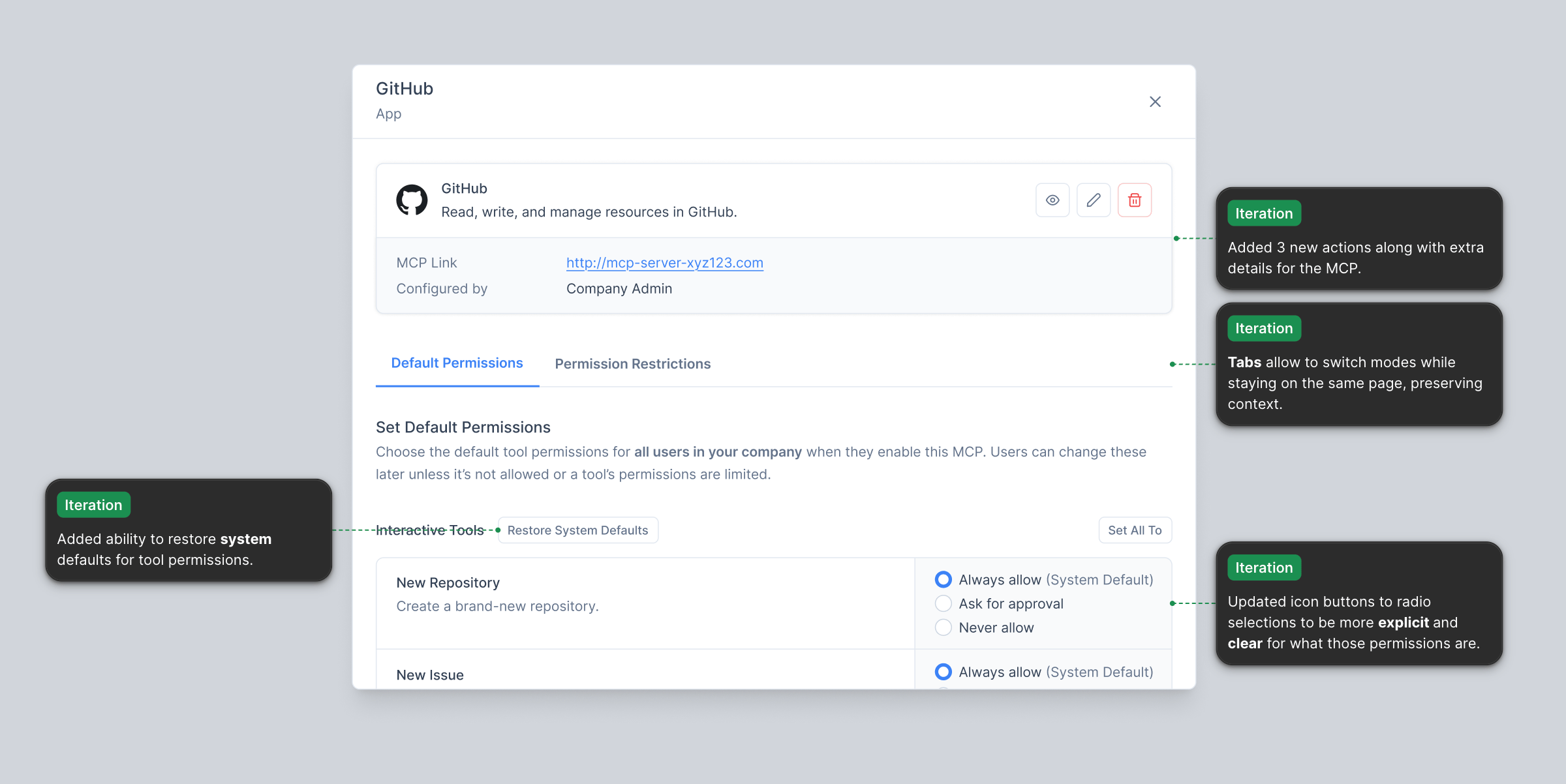
Final design for MCP Settings
Handing Off to Developers
When designs shift from concept to production, I slow down and polish.
That means thinking through edge cases and documenting them clearly, naming layers, wiring up interactive prototypes, and making sure variables and styling are production ready.
I also leave comments throughout the file to spark discussion and resolve open questions with developers to ensure clarity as they build.
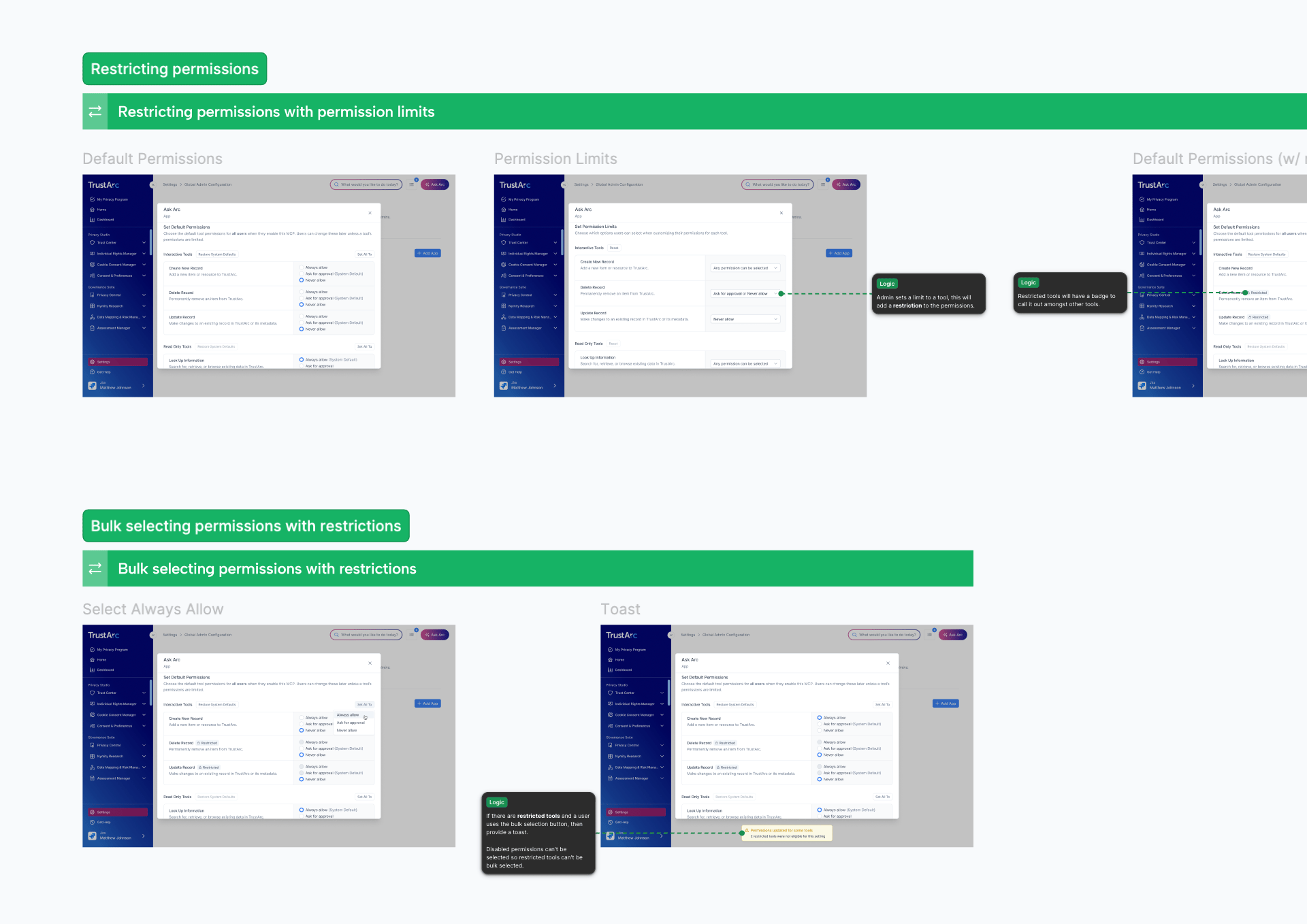
Documentation of edge cases for developers
Creating a Design System
Accelerated development through a custom design system built for Arc UI.
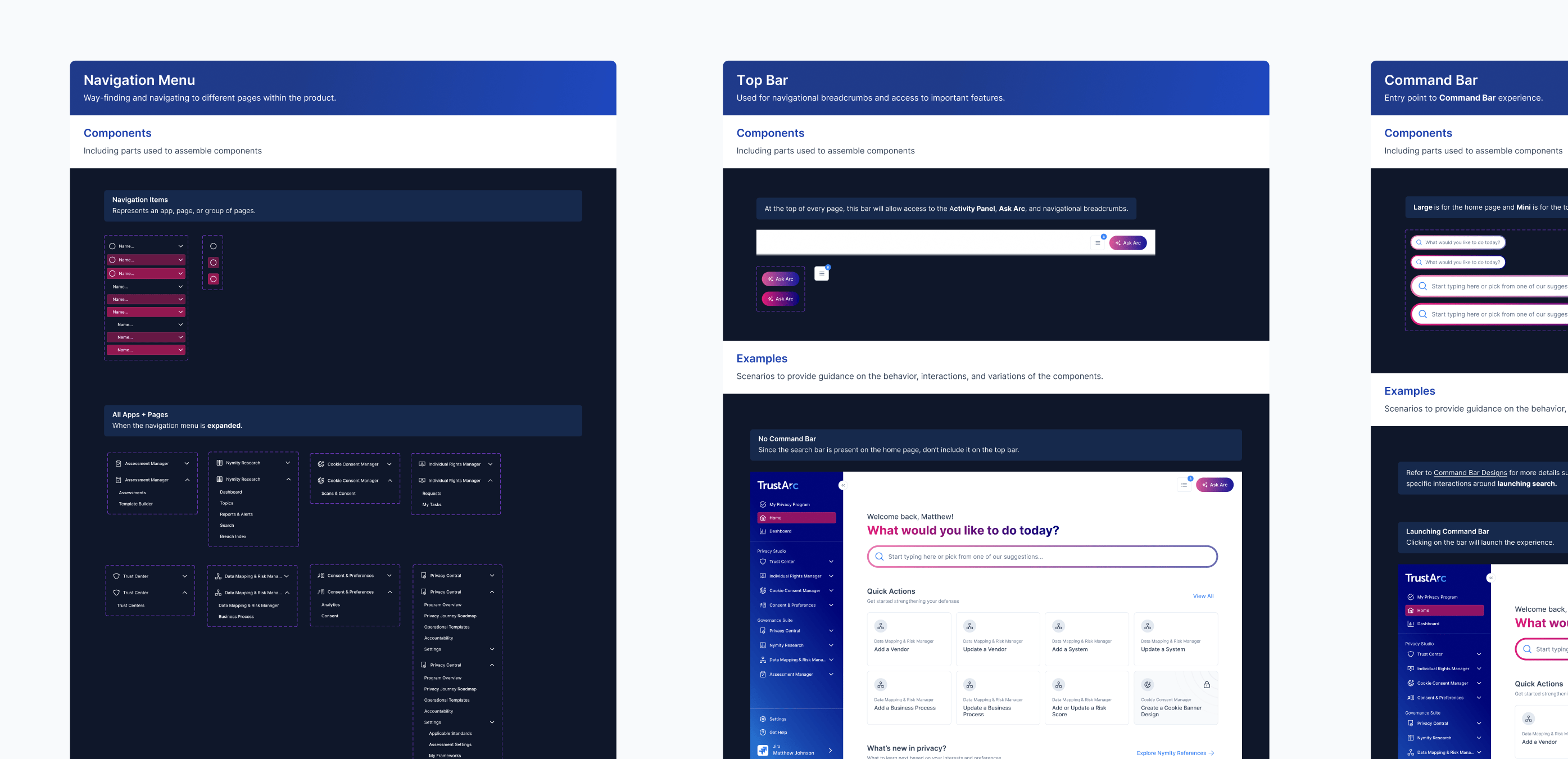
Alongside new AI features, I also led the creation of Arc UI, a modernization of TrustArc's look and feel as a whole.
A new visual direction introduced new colors, styles, components, and patterns, and without structure, that novelty quickly turns into inconsistency, a problem TrustArc had faced in the past.
To address this, I built a design system with documentation to match. It keeps client-side design teams consistent as they build on Arc UI, and it gives developers a clear reference for component behavior.
Condensing Components
A scalable system should have components that are lean and multipurpose. As I redesigned the product, I consolidated aggressively: if a component already served a purpose, I extended it instead of creating a new one.
The clearest win was cards, where I merged over 20+ cards into one master card component that handles every variant through properties.
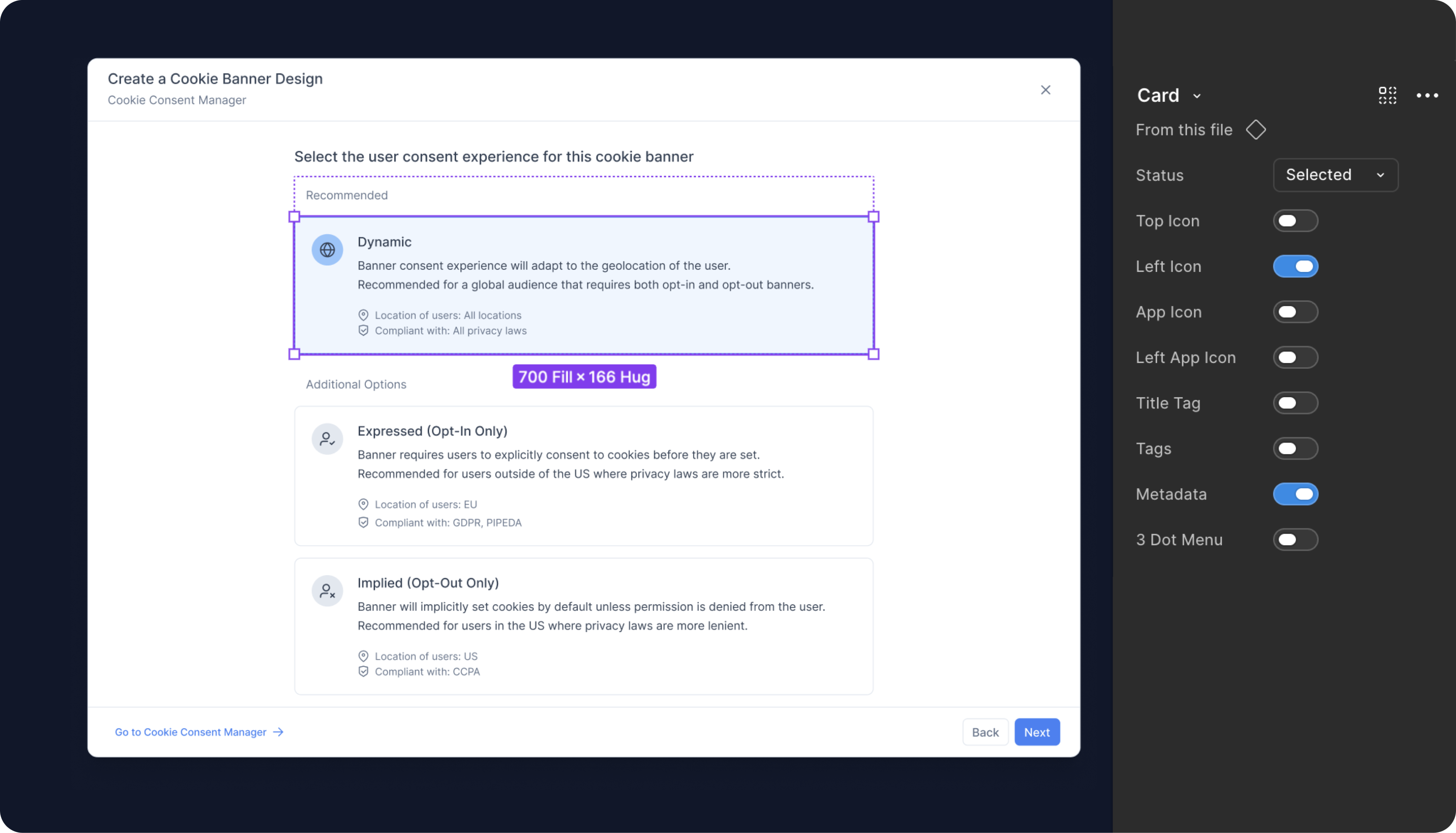
20 different cards → 1 master component
Documentation
I wrote usage guidelines for components, covering the contexts where each one belongs and where to find it in the designs. I also documented common patterns like spacing conventions and table states.
Together, these give developers a reliable reference, so what ships matches closer to what was designed.
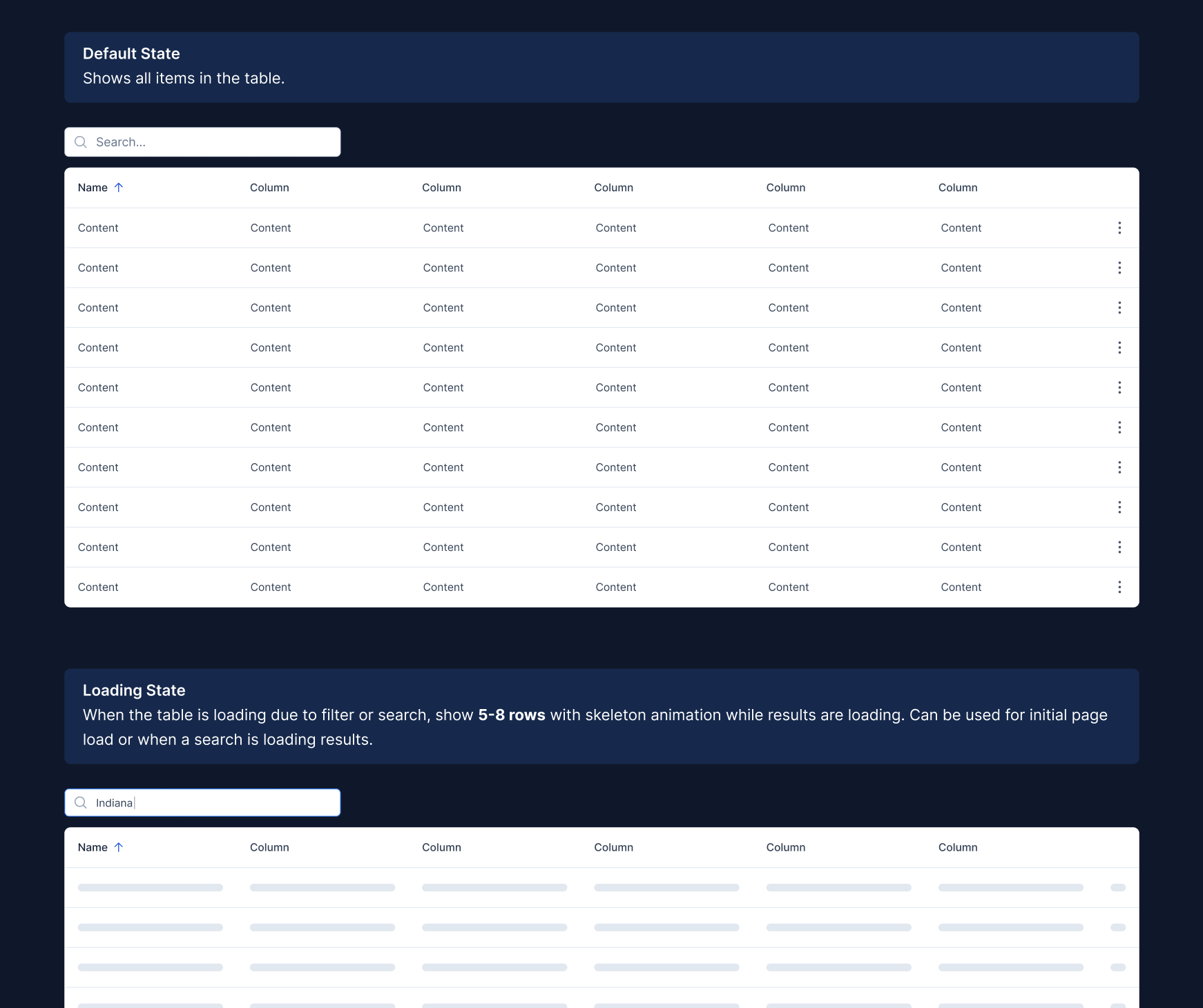
Documentation for table states
Kind words from TrustArc
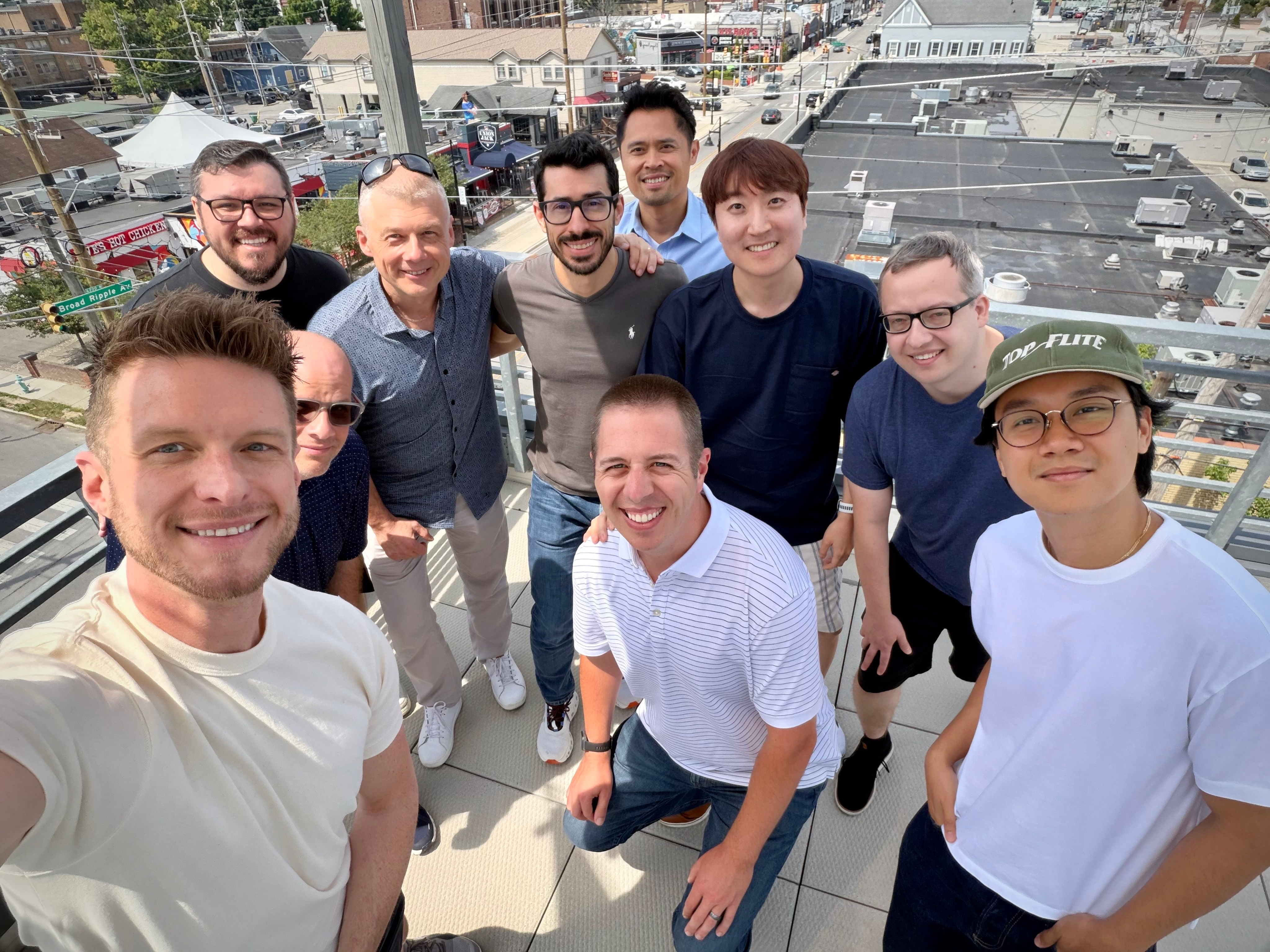
TrustArc at Innovatemap HQ
The team comes to Indianapolis for their leadership summit
I’ve had the opportunity to collaborate closely with Titan on a major transformation of our user experience, and he is one of the strongest product designers I’ve worked with.
Titan has played a key role in helping us reimagine our platform for the AI era, designing interactions and workflows that make complex capabilities feel intuitive, approachable, and genuinely useful. His influence can be seen throughout the product and has helped elevate its overall quality.
What sets Titan apart is the rigor he brings to the design process. He never shows up with a design and simply asks for feedback. He comes prepared with research, clear reasoning, and a deep understanding of the problem he’s solving. His recommendations are thoughtful, well-supported, and grounded in user needs, which makes him a trusted collaborator.
Just as importantly, Titan is someone I genuinely enjoy working with. He’s talented, curious, professional, and always focused on making the product better. Having him on our team for this project has helped us raise the bar across product design, and I recommend him wholeheartedly.

Ian Runyon
CPO @ TrustArc
I had the pleasure of working with Titan while I was at TrustArc, and he was instrumental in bringing a key strategic initiative to life. He’s phenomenal at both concept and production design, but I really valued his judgment about when to go along with the chaos and when to push complex ideas back toward simplicity.Instead of letting things drift into the abstract, Titan would keep us focused with tangible visuals and fresh ideas to help keep us on the tracks. Working with Titan was a highlight of my week, and I’d jump at the chance to do it again.

Eric Sendelbach
Former CTO @ TrustArc
You’ve reached the end.
Thank you for viewing!
Titan Hoang
Work
Play
About
Led designs for Arc Intelligence, modernizing the platform for a new era of privacy work
Team
Titan Hoang (Product Designer)
Spencer Abrams (PM)
Yhareli Miller (Motion Designer)
Client
TrustArc
Design Services
0 → 1 Design

UI Redesign
Concept design
Production design
Design system
AI features
Interactive Prototypes
Design Impact
Design impact contributed to TrustArc’s acquisition by Main Capital Partners (2025)

Shipped AI features, designed complex workflows, and created a new design system

UI Design Gallery
A closer look at a few screens I’ve designed across TrustArc
Redesigned Home Page
Onboarding Step
Quick Tour Step
AI Usage Disclaimer
Ask Arc Chatbot
Command Bar
Dashboard
Privacy Program Overview
Initiative Details Page
Designing and Shipping AI features
Empowering privacy professionals to work smarter and faster with AI.
Privacy work is hard. The laws change constantly, they differ from country to country, and TrustArc, the platform teams use to manage all of it, had a reputation for being tough to learn on its own due to it’s complex capabilities and unintuitive UX.
TrustArc's support team was always flooded with questions about how to use the product, even though a dedicated help site existed. Meanwhile, staying on top of regulatory changes meant users had to comb through a massive research library on their own.
The goal was clear: users didn't need more documentation to dig through, they needed a smarter way to get answers and get work done quickly.
Ask Arc
I designed Ask Arc, an AI assistant built directly into TrustArc that users can open from anywhere in the platform.
It pulls from TrustArc's help documentation and Nymity Research, a knowledge base covering global privacy regulations, to give expert answers in context and remove the need to search for answers themselves.
Now, instead of digging through hundreds of articles to understand a regulatory change or figure out a workflow in the platform, users get what they need right where they're working.
Quick Actions
I also designed Quick Actions, simplified AI-enabled workflows on the home page that cut the platform's most common crucial tasks, such as creating forms and records, down to only the steps that matter.
The focus goes beyond just trimming down steps. With the addition of AI support, agents can now do the heavy lifting in most forms by pulling data from external sources and filling it in automatically (e.g. company details when creating a vendor) so that users can focus more on reviewing than typing.
Tasks that used to feel long and tedious now take a fraction of the effort.
Results
Both features shipped to strong reception and high adoption. Customers told us they were creating vendors in a fraction of the time and moving through their work noticeably faster than before.
“The fact that it can tell me if it’s compliant is a game changer for my team. It takes us days to figure that out today.”
Enterprise user @ IAPP PSR 2025
“It used to take us 3 days to find duplicate records in the system. This is significant time saving.”
Enterprise user @ IAPP PSR 2025
“The UI is amazing. Impressed by how it finds duplicate records in less than 2 minutes.”
Enterprise user @ IAPP PSR 2025
Designing for Complex Problems
Creating an intuitive way for organizations and users to customize their Ask Arc experience.
As Ask Arc grew in adoption, users wanted to customize it with MCPs, which are custom capabilities that connects the AI assistant to external apps.
This created a need for complex permission settings at various account levels and cascading configurations. I know, pretty confusing.
Since this is very complex and users are new to AI, I needed to design this in an intuitive way that will be easy to use.
Mapping the Design
We started with discovery sessions across a range of stakeholders to nail down the requirements and how tool permissions for MCPs should behave at each level.
From there I created a concept map, which did double duty: it let me visualize the logic I was designing and gave stakeholders something concrete to react to and align on.
Once the logic was agreed on, I translated it into concept designs for validation.
Concept map of relationships between different account levels
Feedback & Iterations
With a design this complex, I knew my first pass wouldn't be my best one so I presented interactive prototypes to various stakeholders early and often. This gave me great insight into my design’s usability, especially when access to real users for validation is limited.
Critiques with developers and executives surfaced flaws in my logic and gaps in my designs, and each round brought the design closer to something people could actually follow and understand.
After 3 rounds of iterations, I landed on a final design that earned buy-in across the team, and we shifted from concept to production.
Feedback on V1 of MCP settings
Final design for MCP Settings
Handing Off to Developers
When designs shift from concept to production, I slow down and polish.
That means thinking through edge cases and documenting them clearly, naming layers, wiring up interactive prototypes, and making sure variables and styling are production ready.
I also leave comments throughout the file to spark discussion and resolve open questions with developers to ensure clarity as they build.
Documentation of edge cases for developers
Creating a Design System
Accelerated development through a custom design system built for Arc UI.
Alongside new AI features, I also led the creation of Arc UI, a modernization of TrustArc's look and feel as a whole.
A new visual direction introduced new colors, styles, components, and patterns, and without structure, that novelty quickly turns into inconsistency, a problem TrustArc had faced in the past.
To address this, I built a design system with documentation to match. It keeps client-side design teams consistent as they build on Arc UI, and it gives developers a clear reference for component behavior.
Condensing Components
A scalable system should have components that are lean and multipurpose. As I redesigned the product, I consolidated aggressively: if a component already served a purpose, I extended it instead of creating a new one.
The clearest win was cards, where I merged over 20+ cards into one master card component that handles every variant through properties.
20 different cards → 1 master component
Documentation
I wrote usage guidelines for components, covering the contexts where each one belongs and where to find it in the designs. I also documented common patterns like spacing conventions and table states.
Together, these give developers a reliable reference, so what ships matches closer to what was designed.
Documentation for table states
Kind words from TrustArc
TrustArc at Innovatemap HQ
The team comes to Indianapolis for their leadership summit
I’ve had the opportunity to collaborate closely with Titan on a major transformation of our user experience, and he is one of the strongest product designers I’ve worked with.
Titan has played a key role in helping us reimagine our platform for the AI era, designing interactions and workflows that make complex capabilities feel intuitive, approachable, and genuinely useful. His influence can be seen throughout the product and has helped elevate its overall quality.
What sets Titan apart is the rigor he brings to the design process. He never shows up with a design and simply asks for feedback. He comes prepared with research, clear reasoning, and a deep understanding of the problem he’s solving. His recommendations are thoughtful, well-supported, and grounded in user needs, which makes him a trusted collaborator.
Just as importantly, Titan is someone I genuinely enjoy working with. He’s talented, curious, professional, and always focused on making the product better. Having him on our team for this project has helped us raise the bar across product design, and I recommend him wholeheartedly.
Ian Runyon
CPO @ TrustArc
I had the pleasure of working with Titan while I was at TrustArc, and he was instrumental in bringing a key strategic initiative to life. He’s phenomenal at both concept and production design, but I really valued his judgment about when to go along with the chaos and when to push complex ideas back toward simplicity.Instead of letting things drift into the abstract, Titan would keep us focused with tangible visuals and fresh ideas to help keep us on the tracks. Working with Titan was a highlight of my week, and I’d jump at the chance to do it again.
Eric Sendelbach
Former CTO @ TrustArc
You’ve reached the end.
Thank you for viewing!
Work
Play
About
Led designs for Arc Intelligence, modernizing the platform for a new era of privacy work
Team
Titan Hoang (Product Designer)
Spencer Abrams (PM)
Yhareli Miller (Motion Designer)
Client
TrustArc
Design Services
0 → 1 Design
UI Redesign
Concept design
Production design
Design system
AI features
Interactive Prototypes
Design Impact
Design impact contributed to TrustArc’s acquisition by Main Capital Partners (2025)

Shipped AI features, designed complex workflows, and created a new design system

UI Design Gallery
A closer look at a few screens I’ve designed across TrustArc
Redesigned Home Page
Onboarding Step
Quick Tour Step
AI Usage Disclaimer
Ask Arc Chatbot
Command Bar
Dashboard
Privacy Program Overview
Initiative Details Page
Designing and Shipping AI features
Empowering privacy professionals to work smarter and faster with AI.
Privacy work is hard. The laws change constantly, they differ from country to country, and TrustArc, the platform teams use to manage all of it, had a reputation for being tough to learn on its own due to it’s complex capabilities and unintuitive UX.
TrustArc's support team was always flooded with questions about how to use the product, even though a dedicated help site existed. Meanwhile, staying on top of regulatory changes meant users had to comb through a massive research library on their own.
The goal was clear: users didn't need more documentation to dig through, they needed a smarter way to get answers and get work done quickly.
Ask Arc
I designed Ask Arc, an AI assistant built directly into TrustArc that users can open from anywhere in the platform.
It pulls from TrustArc's help documentation and Nymity Research, a knowledge base covering global privacy regulations, to give expert answers in context and remove the need to search for answers themselves.
Now, instead of digging through hundreds of articles to understand a regulatory change or figure out a workflow in the platform, users get what they need right where they're working.
Quick Actions
I also designed Quick Actions, simplified AI-enabled workflows on the home page that cut the platform's most common crucial tasks, such as creating forms and records, down to only the steps that matter.
The focus goes beyond just trimming down steps. With the addition of AI support, agents can now do the heavy lifting in most forms by pulling data from external sources and filling it in automatically (e.g. company details when creating a vendor) so that users can focus more on reviewing than typing.
Tasks that used to feel long and tedious now take a fraction of the effort.
Results
Both features shipped to strong reception and high adoption. Customers told us they were creating vendors in a fraction of the time and moving through their work noticeably faster than before.
“The fact that it can tell me if it’s compliant is a game changer for my team. It takes us days to figure that out today.”
Enterprise user @ IAPP PSR 2025
“It used to take us 3 days to find duplicate records in the system. This is significant time saving.”
Enterprise user @ IAPP PSR 2025
“The UI is amazing. Impressed by how it finds duplicate records in less than 2 minutes.”
Enterprise user @ IAPP PSR 2025
Designing for Complex Problems
Creating an intuitive way for organizations and users to customize their Ask Arc experience.
As Ask Arc grew in adoption, users wanted to customize it with MCPs, which are custom capabilities that connects the AI assistant to external apps.
This created a need for complex permission settings at various account levels and cascading configurations. I know, pretty confusing.
Since this is very complex and users are new to AI, I needed to design this in an intuitive way that will be easy to use.
Mapping the Design
We started with discovery sessions across a range of stakeholders to nail down the requirements and how tool permissions for MCPs should behave at each level.
From there I created a concept map, which did double duty: it let me visualize the logic I was designing and gave stakeholders something concrete to react to and align on.
Once the logic was agreed on, I translated it into concept designs for validation.
Concept map of relationships between different account levels
Feedback & Iterations
With a design this complex, I knew my first pass wouldn't be my best one so I presented interactive prototypes to various stakeholders early and often. This gave me great insight into my design’s usability, especially when access to real users for validation is limited.
Critiques with developers and executives surfaced flaws in my logic and gaps in my designs, and each round brought the design closer to something people could actually follow and understand.
After 3 rounds of iterations, I landed on a final design that earned buy-in across the team, and we shifted from concept to production.
Feedback on V1 of MCP settings
Final design for MCP Settings
Handing Off to Developers
When designs shift from concept to production, I slow down and polish.
That means thinking through edge cases and documenting them clearly, naming layers, wiring up interactive prototypes, and making sure variables and styling are production ready.
I also leave comments throughout the file to spark discussion and resolve open questions with developers to ensure clarity as they build.
Documentation of edge cases for developers
Creating a Design System
Accelerated development through a custom design system built for Arc UI.
Alongside new AI features, I also led the creation of Arc UI, a modernization of TrustArc's look and feel as a whole.
A new visual direction introduced new colors, styles, components, and patterns, and without structure, that novelty quickly turns into inconsistency, a problem TrustArc had faced in the past.
To address this, I built a design system with documentation to match. It keeps client-side design teams consistent as they build on Arc UI, and it gives developers a clear reference for component behavior.
Condensing Components
A scalable system should have components that are lean and multipurpose. As I redesigned the product, I consolidated aggressively: if a component already served a purpose, I extended it instead of creating a new one.
The clearest win was cards, where I merged over 20+ cards into one master card component that handles every variant through properties.
20 different cards → 1 master component
Documentation
I wrote usage guidelines for components, covering the contexts where each one belongs and where to find it in the designs. I also documented common patterns like spacing conventions and table states.
Together, these give developers a reliable reference, so what ships matches closer to what was designed.
Documentation for table states
Kind words from TrustArc
TrustArc at Innovatemap HQ
The team comes to Indianapolis for their leadership summit
I’ve had the opportunity to collaborate closely with Titan on a major transformation of our user experience, and he is one of the strongest product designers I’ve worked with.
Titan has played a key role in helping us reimagine our platform for the AI era, designing interactions and workflows that make complex capabilities feel intuitive, approachable, and genuinely useful. His influence can be seen throughout the product and has helped elevate its overall quality.
What sets Titan apart is the rigor he brings to the design process. He never shows up with a design and simply asks for feedback. He comes prepared with research, clear reasoning, and a deep understanding of the problem he’s solving. His recommendations are thoughtful, well-supported, and grounded in user needs, which makes him a trusted collaborator.
Just as importantly, Titan is someone I genuinely enjoy working with. He’s talented, curious, professional, and always focused on making the product better. Having him on our team for this project has helped us raise the bar across product design, and I recommend him wholeheartedly.
Ian Runyon
CPO @ TrustArc
I had the pleasure of working with Titan while I was at TrustArc, and he was instrumental in bringing a key strategic initiative to life. He’s phenomenal at both concept and production design, but I really valued his judgment about when to go along with the chaos and when to push complex ideas back toward simplicity.Instead of letting things drift into the abstract, Titan would keep us focused with tangible visuals and fresh ideas to help keep us on the tracks. Working with Titan was a highlight of my week, and I’d jump at the chance to do it again.
Eric Sendelbach
Former CTO @ TrustArc